• Skip to primary navigation
  • Skip to main content
  • Skip to primary sidebar
  • Skip to footer

Whipperberry

WhipperBerry • Your Home For Creative Inspiration

  • Home
  • Recipes
    • Starters
    • Easy Weeknight Dinners
    • Main Dish
    • Salads
    • Side Dish
    • Soups & Stews
    • Desserts
    • Breakfast
    • Miscellaneous
  • Tutorials
    • Creative Crafts
    • DIY Decor
    • Fabric Crafts
    • Food How-To
    • Jewlery
    • Paint Projects
    • Paper Art
    • Party Styling
    • Photography and Graphic Design
    • Silhouette
  • Holidays
    • Easter
    • Mother’s Day
    • Father’s Day
    • 4th of July
    • Halloween
    • Thanksgiving
    • Christmas
    • Valentine’s Day
  • Gift Ideas
    • Gifts For Everyone
    • Gifts for Dad
    • Mother’s day
    • For The Girls
    • For The Kids
    • Teacher Gift Ideas
    • Christmas
  • Printables
    • Holiday
    • Gift Idea
    • LDS Primary
  • Travel
  • About
    • Terms
  • Contact
  • Nav Social Menu

    • Facebook
    • Instagram
    • Pinterest
    • RSS
    • Twitter

Bing

Bing in the Classroom

0 · May 22, 2014 · Leave a Comment

This post was created in partnership with Bing. //  I’m still in awe sometimes when it comes to the internet. The unfathomable amount of information that is available just at the click of your mouse is mind boggling! I’m mean really… if you were born before or while Ronald Regan was in office, you saw Top Gun in the movie theaters you also remember research projects being a MUCH BIGGER DEAL than they are today!! The vast amounts of amazing information at our finger tips is unprecedented. With that kind of power comes great responsibility!

Bing-in-the-Classroom

I know when I sit down with my kiddos while they are working on the internet I cringe a little. When my daughter Emily was just learning how to spell her name, she typed her name into a web search and I was shocked as to what appeared on our screen. It was just a simple search on her name, that should be safe, right? Nope… All kinds of porn images smacked us in the face. She was FOUR!!

It was a huge wake-up call for me. From that point I have been very vigilant when it comes to my kiddos and the internet. Even if they are searching for simple age appropriate things, sometimes the ads that bombard them aren’t the best.  I know that when I am at home with them I can monitor their internet usage, but what about when they are at school. One teacher cannot sit and look over the shoulder of 20-30 kiddos every single time they are using the internet at school monitoring the content that they are viewing. That is why the folks at Bing have created Bing in the Classroom.

Bing has created a safe, ad-free space for our children to explore in. Think about all of the wonderful place you can go and see now without even having to leave the classroom!

Screen-Shot-2014-05-22-at-9.20.29-AM

We can help Bing reach even more kiddos. Last month I told you about the Bing Rewards Program, where you can earn points every single time you do a Bing search, well when you sign up for Bing Rewards you can choose to donate your Bing Rewards to your local school to help provide Surface Tablets in the classroom.  This is a fabulous program that will help our kiddos discover all the amazing things the world has to offer with tablets in the classroom that are free of ads, with strict adult content filters and enhanced privacy protection. All you have to do is search away on Bing!! It’s a win/win so Sign up for Bing Rewards!  You can also show your support for Show support for #adfreesearch for our kiddos!

Bing Rewards // Get Paid for Your Curiosity

0 · Apr 10, 2014 · Leave a Comment

// This post brought to you by Bing Rewards // 

Bing-Rewards---get-paid-for-your-curiosity

How many times a day do you have a burning question that you need to have answered?

How many cups in a gallon of milk?

How many calories are in my favorite sandwich at Panera?

When did Thomas Edison invent the light bulb?

Where should we go for lunch?

What is the temperature going to be today?

What is the best time to plan my vacation to Hawaii?

Now… how many times to your turn to your smartphone or the internet to help answer these questions? If you are anything like us, almost 100% of the time! I laugh every single time my husband and I go out on a date. We sit and chat about all kinds of stuff and inevitably, one of us brings up and fun idea or some type of question that we need a little more information on. Within seconds my husband heads straight to his iPhone and almost instantly we have answers to our query!

We live in amazing times… We have a record amount of data and information right at our finger tips. Homework for our kiddos has been revolutionized with the advent of the internet. When I was growing up, if I had a question that needed to be answered for school I had to either rely on my parents knowledge (amazing in some areas, weak in anything that predated Eisenhower), turn to our 1970’s era World Book collection where Nixon was still in office, or high tail it to the library for hours and hours of digging through card catalogs and books. Either way, a research paper in my day involved TONS of effort on my part. Our kids are sooooo lucky they have amazing tools like…

 With Bing, you have the answer to ANY question right at your finger tips within seconds.

Want to sweeten the deal?

Did you know that you can be rewarded for your curiosity? Have you heard of Bing Rewards? You can actually earn points every time you Bing something! You can then redeem your points for all kinds of goodies like restaurant gift cards, movie tickets, credit for online boutiques, all kinds of fun stuff.  How cool is that? I can earn a Starbucks gift card for just doing what I normally do everyday!

How to Start Earning Bing Rewards

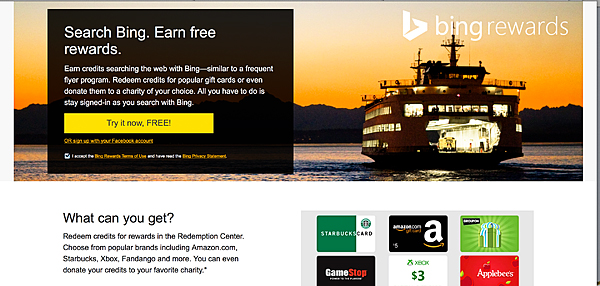
First, all you have to do is visit Bing Rewards and sign up for the program.

Bing-Rewards-Program


Don’t worry it’s super quick and they don’t ask any personal information. Then all you have to do is start Binging! They even have extra ways to earn more point by doing little things like making Bing your homepage and stuff. I love checking out the bing home page everyday. The imagery is amazing!

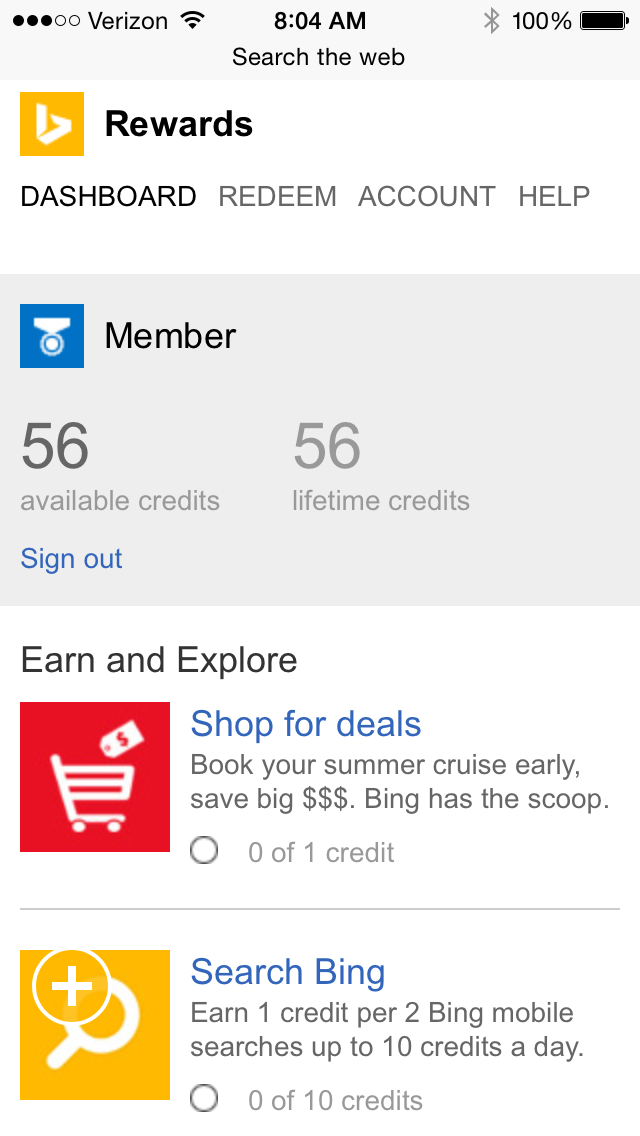
Don’t worry if you aren’t by your computer all the time… You can even Bing on your smartphone!! Just add the Bing app to your Apple or Android phone and you’re in business…

Bing-on-iPhone


Doesn’t it look fabulous?! I’m such a visual person and I love it. Now I can earn points every time my husband and I come up with some dorky question while we’re out and about. Then I can keep track of my points right on my phone as well…

photo 1

Why not get paid to do something we are already doing? It’s a win/win if you ask me. Visit Bing Rewards today and start getting paid for your curiosity!!

I’m required to disclose a sponsored partnership between our site and Bing. I have been compensated in exchange for this post in the form of payment, product or experiences.

Primary Sidebar

Heather from Whipperberry
Hello... my name is Heather and I'm the creator of WhipperBerry a creative lifestyle blog packed full of great recipes and creative ideas for your home and family. I find I am happiest when I'm living a creative life and I love to share what I've been up to along the way... Come explore, my hope is that you'll leave inspired!

Footer

  • Privacy Policy
  • Crafts
  • Food
  • Gifts
  • Holidays
  • Home
  • Mom Life
  • Recipes
  • Travel

Copyright © 2026 · Seasoned Pro